AI Built Your Website in a Weekend. Who Updates It on Monday?
AI has made websites far faster to build, but it hasn't removed the need to operate them. Meet the Monday Problem, and the five-question test to run before you launch.
 Aditya Kadam
Garchi CMS
Aditya Kadam
Garchi CMS
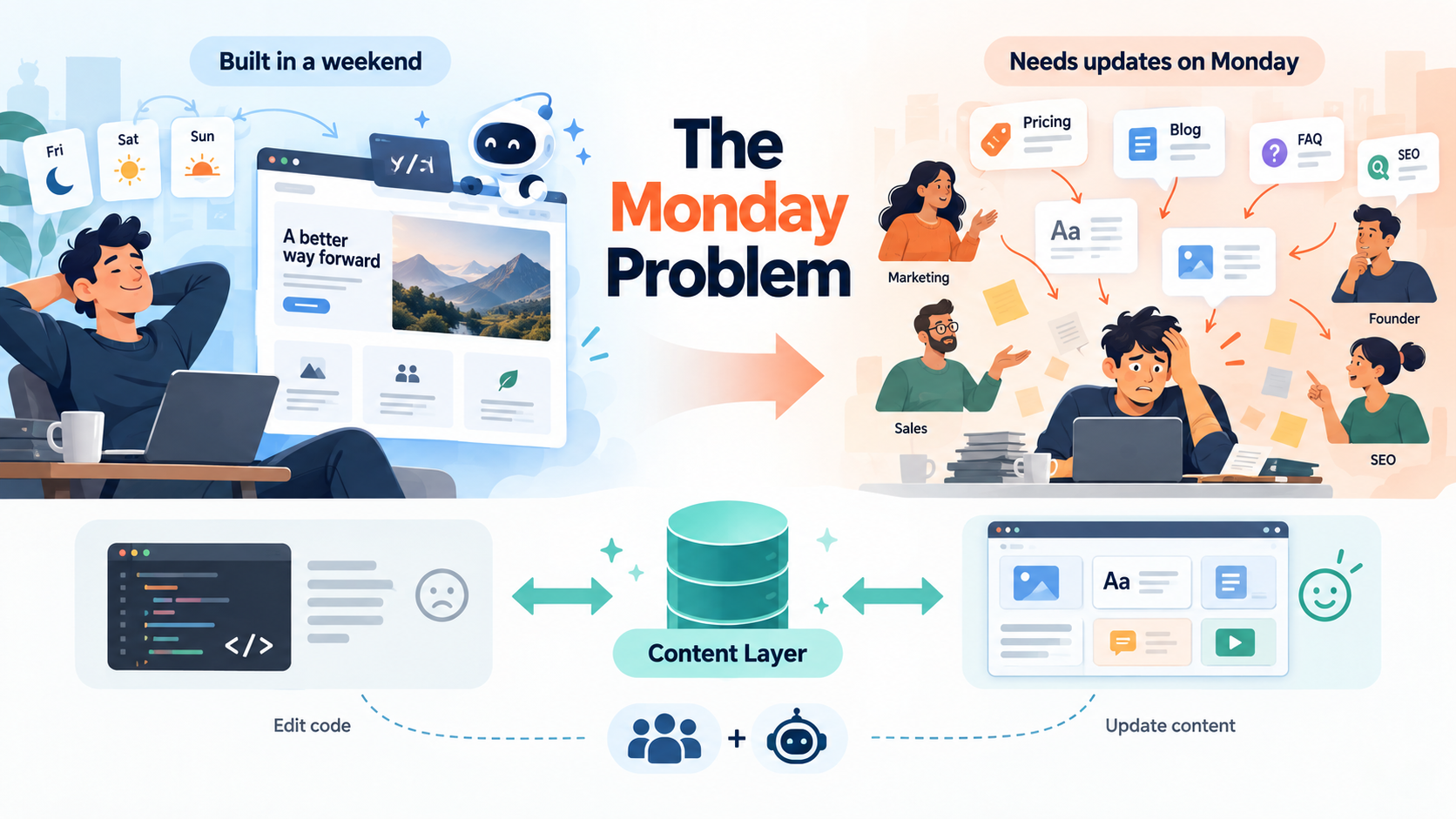
On Friday evening, John Doe opens an AI coding tool and starts describing the website they want. A homepage, a pricing page with three plans, a blog, customer testimonials, product pages, SEO metadata and a layout that works on a phone.
Over the weekend, John goes back and forth with the tool, adjusting colours, rewriting the hero section and fixing the odd spacing issue on mobile. By Sunday evening the site is live, and it looks good.
That deserves some appreciation. Not long ago, getting to this point meant hiring someone, writing a brief and waiting. Tools such as Claude Code, Cursor, Lovable, Bolt and Replit have made building software far faster and cheaper, and vibe coding has put real capability in the hands of people who could never have built a website on their own.
But what happens on Monday?
Monday is when the website stops being a coding project and becomes part of a business with customers, deadlines and colleagues who have opinions.
Monday morning's to-do list
Marketing demands to test a different homepage headline. Sales hat demands need to refine pricing, so the Pro plan needs to go from £49 to £59 a month. A happy customer has agreed to a case study. SEO wants a new landing page. One testimonial is out of date, a new product needs adding, and the FAQ needs updating.
None of these requests is really about software. Nobody wants the pricing card to behave differently or the blog to render in a new way. They want to change words, numbers and pages. These are content changes.
Yet on many AI-built websites, each of them means someone has to open the source code, find the right file, make the edit, commit it and redeploy the site. Sometimes that someone is a developer, while sometimes it is a person using AI tools to code, asking the coding tool to find where the price is written.
There is a sensible reason for this. The quickest route from a prompt to a good-looking website is to write the copy straight into the page components. For a weekend build, that is a fair trade. It starts to hurt once the site has to keep up with a business.
AI has dramatically reduced the cost and time required to build a website. It hasn't eliminated the need to operate one.
Building a website and operating a website are two different problems. Building is a project with a finish line. Operating is ongoing: dozens of small changes every month, requested by people in different roles, most of whom have no wish to open a code editor. A tool can be brilliant at the first problem without touching the second.
The accidental return of the webmaster
If you worked with small business websites in the 2000s, you will remember a particular sentence: "Can you ask the web developer to change that?" A typo on the About page meant an email, a wait and, occasionally, an invoice.
AI was supposed to remove more of that dependency, and in many ways it has. But there is a risk we quietly swap one bottleneck for another. "Can you ask the developer to change that?" turns into "Can you ask Cursor to change that?" or "Can someone get Claude to update the pricing page?"
Technologically, those are very different situations. A coding agent is faster, cheaper and happy to work at midnight. Organisationally, they can look surprisingly similar. Someone still needs access to the repository, the know-how to prompt the tool, time to check what it changed and a way to deploy the result. The marketing manager still can't change the headline on their own.
Replacing "ask the developer" with "ask the coding agent" isn't necessarily content management.
This isn't a criticism of AI coding tools, which are doing what they were built to do. The trouble is that we ask them to handle content changes by editing code, because that is where the content lives. Every headline tweak becomes a small software change, with a diff to review and a deployment that can fail for reasons unrelated to the headline. And each time an agent opens a component to change one sentence, it has the opportunity to change something else too.
Code and content are not the same thing
This distinction is the key idea, even if you have never used a content management system. Code decides how things look and behave. Content is what you are actually saying.
| Code | Content |
|---|---|
| How a pricing card looks and behaves | Pro plan, £59/month |
| How a blog page renders | The blog article |
| How testimonials are displayed | The customer quote |
| How navigation works | The menu labels |
| How product pages are rendered | The product information |
| How an FAQ component behaves | The questions and answers |
A pricing card component knows how to show a plan name, a price, a list of features and a button. It doesn't need to know what the Pro plan costs this quarter.
Your AI coding tool should be excellent at building the left-hand side. Your team shouldn't need to rebuild the left-hand side every time they change the right-hand side.
When both columns are tangled together in the same files, every content change becomes a code change. Keep them apart, and most of Monday's requests stop involving code at all.
Build the experience in code. Manage the content outside it.
In practice, that looks like three layers.
Website (what your visitors see)
      ↓  asks for content
Content API
      ↓  returns
Structured content (headlines, prices, articles, FAQs)
Start at the bottom. Structured content means storing content as organised pieces instead of text buried inside a page. A pricing plan becomes a record with a name, a price and a list of features. A blog article has a title, an author, a body and a publish date. Because every piece has a predictable shape, the website knows what it is getting when it asks for one.
The content API in the middle is the doorway the website uses to ask for "the current pricing plans" or "the five latest articles". The website at the top, built by developers or AI coding tools, decides how everything is presented: plans as cards, articles in a grid, FAQs as an accordion.
With this arrangement, the people who own the content can change it through a dashboard without touching the website's code. When sales updates the Pro plan price, nobody opens a component. Depending on how the site is set up, the new price appears straight away or on the next rebuild, and the frontend stays as it was.
A system that works this way is usually called a headless CMS. The idea has been around for years. What is new is how much more useful it becomes when AI is building the frontend and, increasingly, helping to manage what goes into it.
Your AI shouldn't need your Git repository to change a headline
The point here isn't "don't let AI change your website". AI is useful for content work, from drafting articles to tidying metadata. The question is how it does that work. Compare two ways of asking for the same change.
Model 1: "Claude, open this React component and change the Pro plan price from £49 to £59."
Model 2: "Claude, update the Pro plan price to £59."
In the first model, the price is a line of code. The AI has to find the right file, understand the component and edit it without disturbing anything nearby, and the change then goes through a build and deployment like any other code change. The person asking has to know a React component is involved at all.
In the second model, the price is business information. The AI finds the Pro plan in the content system, updates one field and leaves the application alone. It is working with structured business content through a defined interface, and the person asking only needs to know what they want changed. AI should be able to change content without needing to rewrite the application.
Creating an article, changing SEO metadata, updating a product description, adding an FAQ, rewriting a headline and retrieving existing content are all content operations. Ideally, an AI performs them through controlled tools or APIs.
Where MCP fits in
Model Context Protocol, or MCP, is an open standard that lets AI assistants and agents connect to other software through clearly defined tools. Anthropic introduced it in late 2024, and a growing number of AI tools now support it.
In plain terms, a piece of software can offer an AI a menu of actions it is allowed to take. Instead of handing an assistant unrestricted database access or asking it to rewrite source code, a content system might expose actions such as "create article", "update page", "retrieve product" or "change metadata". The AI picks the right action, and the system carries it out.
Clear boundaries are easier to govern
There is an important difference between "AI has unrestricted access to my application and database" and "AI can perform a defined set of content operations".
With unrestricted access, a request to fix a typo could, in principle, touch anything. With a defined set of operations, you can see which actions exist, validate what goes into them, keep a record of what was done and have a person approve changes before they go live. That doesn't make AI infallible, and it isn't a complete security strategy on its own. It does make AI activity easier to reason about and govern.
Why we're building Garchi CMS
This problem is one of the reasons we're building Garchi CMS.
We think developers, and the AI coding tools they work with, should stay free to build the frontend however they like. The business content that changes every week should live separately as structured content, where your team can manage it from a dashboard without going near the codebase. Your application consumes that content through an API, and compatible AI tools can work with the same content through Garchi's MCP server instead of editing your application.
Developer or AI coding tool  →  builds the frontend
Frontend  →  API  →  structured content
Your team  →  manages content in the dashboard
AI agent  →  controlled content tools via MCP
One design decision follows from the governance point above. When an AI assistant creates or edits content through Garchi's MCP server, the change is saved as a draft, and a person on your team decides when it gets published.
Garchi is one practical way to apply this principle, and the principle is worth adopting whichever tools you choose.
The Monday Test
Before you launch an AI-built website, run through these five questions.
- Can someone change the homepage headline without editing code? "Yes, by asking the coding agent" counts as a no.
- Can marketing publish content without asking a developer?
- Can pricing or product information change independently of the frontend?
- Is there one structured source of truth for important business content? If the Pro plan price appears on three pages, it should be stored once.
- Can AI update content through controlled tools instead of rewriting the application? And can a person review the change before visitors see it?
If the answer to all five is yes, your AI-built website probably isn't just easy to build. It's also ready to operate.
If some answers are no, that is normal for a weekend build, and far easier to fix before launch than after six months of copy has piled up inside your components.
Garchi CMS is our attempt to build this kind of content layer for the AI development era. If you recognise the Monday Problem in your own project, you're welcome to read the documentation or see how the Garchi MCP server connects to the AI tools you already use.
Enjoyed this article?
Get the next one in your inbox, with new Garchi features and practical ideas for running content operations with your team and AI agents. No spam, and you can unsubscribe at any time.