
You would rather see a change before your customers do.
AI can't publish your pages
Your AI's changes to a page, or to a published post or product, are saved as a draft. Visitors keep seeing the published version until the changes are published.
Your website, your app, your blog and your social posts. Your team writes and edits them in Garchi, your AI drafts alongside you, and you decide what goes out.
Change your site without touching its code, and post to LinkedIn, Instagram and Facebook from the same place.
Free plan · no card needed
What is Garchi?
Garchi is a content management system (CMS) for everything you publish: the pages and blog on your website or app, your product details and your social posts. Your team writes and edits, your AI tools draft, a person approves. Your site shows what you publish, and Garchi posts the rest to your social channels.
Write and change pages, posts, products and photos in your browser. Preview, set a time to publish, and undo a mistake.
Your site shows what you publish in Garchi. You or your AI coding tool connect it once, and content changes never touch the code again.
Claude, ChatGPT, Cursor and similar tools write and edit drafts in Garchi. A person reviews them and decides what goes live.
Developers get a full API and ready-made starter sites too. The docs cover the details.
Words, prices, photos, articles and social posts change every week, long after the build is done.
Today that means a developer for the site, another app for social posts, and copying what your AI wrote from a chat window. With Garchi it all happens in one place: you make the change in a minute, or ask your AI to draft it.
How it works
Each part of your site, like a feature card or a price box, has a few blanks to fill: a title, a short description, an icon. Those same blanks appear in Garchi, where you, your team or your AI fill them in.
type Props = { step_number?: string; title?: string; description?: string; icon?: string; [x: string]: any;}; export default function StepItem({ step_number, title, description, icon, ...props}: Props) { return ( … );}It lists the blanks it needs. That's all.

The same blanks, filled in, with the page updating beside them.
step_number
title
description
icon
Your design, your hosting and the code you or your AI wrote stay as they are. Garchi works alongside them.
Text, images and product details move into Garchi. You or your AI coding tool connect the site once.
Update a headline, fix a price or publish an article in Garchi, or ask your AI to draft it. The code stays untouched.
All three work on the same content, so nobody copies text between tools.
Connect Claude, ChatGPT, Claude Code or Cursor and ask in plain words. It drafts pages, writes blog posts, updates products and uses the images you already have. Connecting takes a link and one click to approve.
There's nothing to install or build. When your AI changes a page or a published post, the change waits as a draft and visitors keep seeing the current version. Only a person can publish a page.
YOUR AI AGENT
Your AI sees the same pages, posts and images your team does, and makes the same kinds of changes.
Drafts and undo
Let an AI edit your live site directly and one bad sentence reaches your customers. In Garchi its changes to pages, posts and products stay drafts until they are published, and you can undo them.
You would rather see a change before your customers do.
Your AI's changes to a page, or to a published post or product, are saved as a draft. Visitors keep seeing the published version until the changes are published.

You notice it days later, and nobody remembers what it said before.
Changes to pages, posts and products leave a restore point for 30 days, labelled with who made them. Going back takes one click.

A list of changes doesn't tell you whether the page looks right.
Preview an unpublished page on your own site. Only you can see it until you publish.
Fixing one word means waiting for a developer.
Your words live outside the code, so changing them never means changing the code.
Publishing
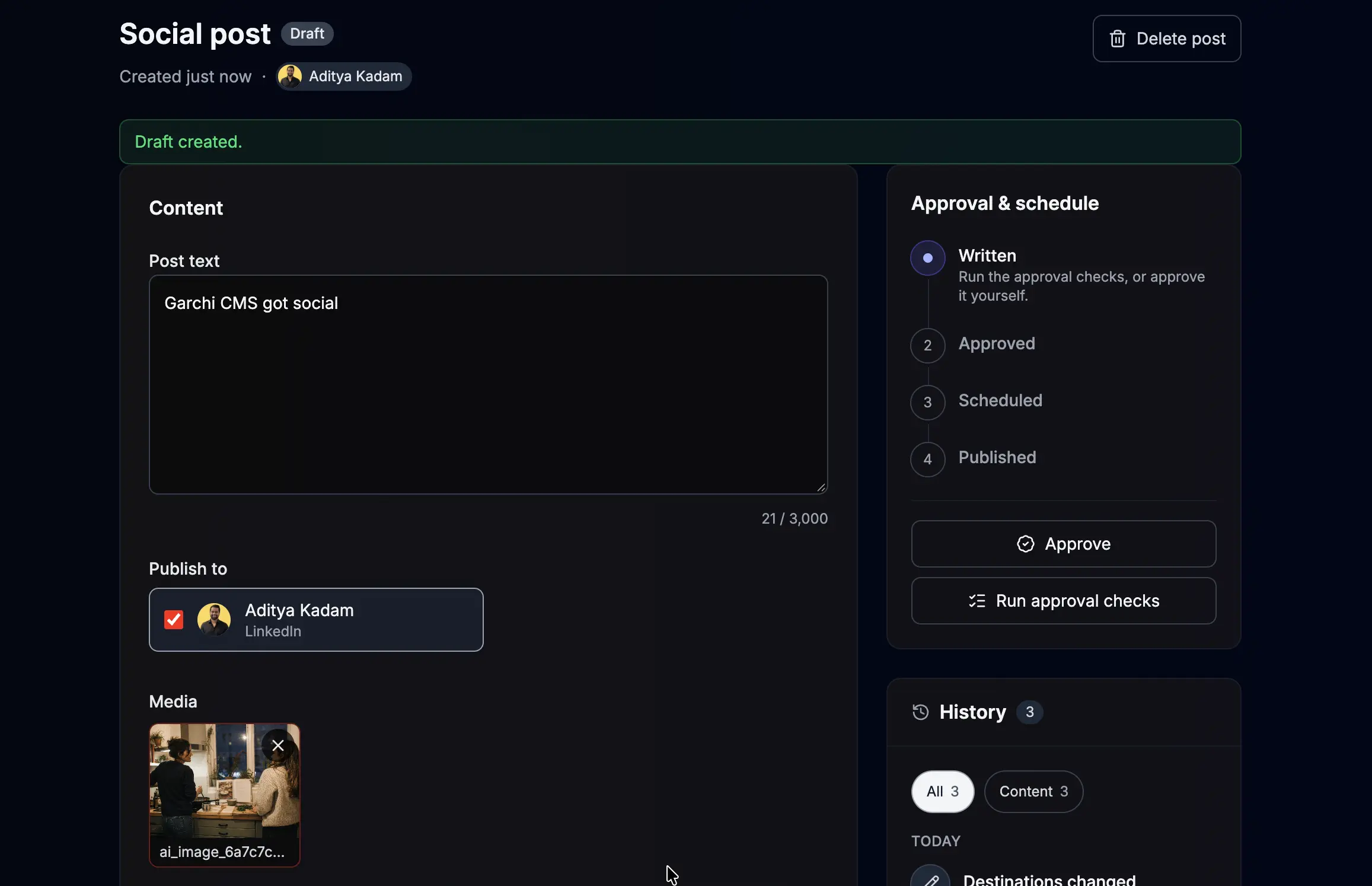
Turn a new article or product into a social post. Write it in Garchi, get it approved, then post it now or at a set time, next to the rest of your content.
Draft
Write it, or let your AI draft it from content you already have.
Approve
Someone reads it and signs it off.
Schedule
Send now or set a time. Editing an approved post reopens the approval.
Publish
Garchi posts to each channel and records what happened on each one.
Your AI can draft a post and send it for approval. Approving, scheduling and publishing stay with you and your team.
Images and video both work. Every plan includes a number of publishes, and every post keeps a record of what was sent and what each channel did with it.
Already use a dedicated social platform? Keep it. Garchi posts what you write here, and your other tools carry on with replies, analytics and campaigns.
What's included
An editor for your team, a connection for your site and a way in for your AI tools. We run all of it, so you can get back to your product.
Pages, articles, products, categories, images and translations. Whoever looks after the content edits it in the browser, without touching the code.
Built it with an AI tool or with a developer? Either way your site shows what you publish in Garchi, and ready-made starter sites help a developer connect it.
Claude, ChatGPT, Claude Code and Cursor connect to Garchi with a link. There's nothing for you to build or keep running.
We run and update Garchi for you. Each website or project gets its own space, with its own content and its own team.
Starter kits
Starting from scratch? Run one command, or ask your AI coding tool to run it for you. Starters exist for Next.js, Nuxt and Laravel, and any other kind of site can connect too.
npx @lumenharbor/garchi-starter-kit -k next
Your content, your way
Your blog posts have authors. Your products have sizes and colours. Your events have dates and venues. Every item in Garchi starts with a title, a description and images, and you add the extra details each kind needs. Give a kind its own form, and every product or event looks the same.
Built for
Whichever sounds like you, you start on the same free plan.
Built it with AI
You built the site with Lovable, Bolt, Cursor or Claude Code. Now every wording change means prompting again and hoping nothing else moves. Put the content in Garchi, and the same AI can still edit it, as drafts you check first.
Small product teams
Give marketing and support people a place to manage landing pages, articles and product details. Developers keep working on the product instead of on wording changes.
Founders and marketers
Publish an article on your site, then turn it into a LinkedIn, Instagram or Facebook post from the same place, with someone signing it off first.

Product tour
Sign up, then ask your AI tool to set up your first page or post, or start in the editor yourself. The free plan needs no card.
Free plan · no card needed